
Google has detailed what it calls an “advanced flow” for installing apps from unverified developers once mandatory developer registration kicks in later this year.
The process requires enabling developer mode, surviving multiple scare screens, restarting your device, and then waiting a full day before you can do what you used to do freely.
That’s the concession. The original plan, announced last August, was blunter: no more installing apps from developers who haven’t handed Google their legal name, address, email, phone number, and in some cases a copy of their government ID.
After developers and users pushed back, Google said it would preserve a path for “power users.” This is that path.
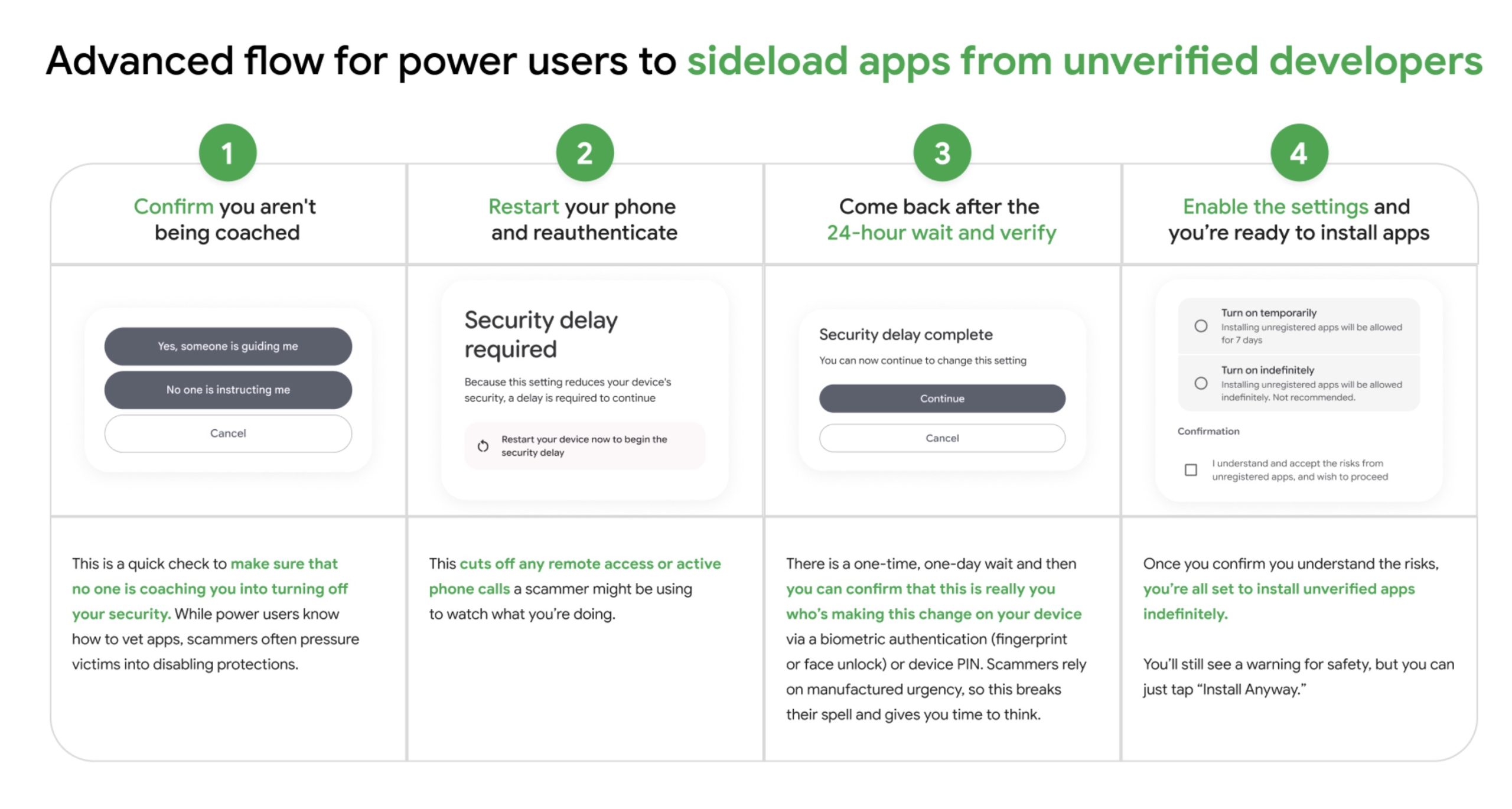
Here’s what the path actually looks like. Tap your build number seven times to enable developer mode. Navigate to Settings, find Developer Options, scroll to “Allow Unverified Packages,” and flip the toggle. Answer a screen that asks if you’re being coerced. Enter your PIN. Restart your phone. Wait 24 hours. Return to the menu. Scroll past more warnings. Choose “Allow temporarily” (seven days) or “Allow indefinitely.” Confirm you understand the risks. Now you can install apps.
That’s ten steps, including a mandatory overnight delay, to do something Android users have always been able to do with a single settings toggle.
Google isn’t hiding that the friction is intentional. Matthew Forsythe, Google’s director of product management and app safety, promised a “high-friction” process earlier this year, and he delivers.
Each additional step is a calculated bet that some percentage of users will give up, decide it’s not worth it, and stick to verified apps. That’s what “high-friction” means. Fewer people sideload.
Forsythe published a blog post framing the whole architecture as anti-scam design. The waiting period is there, he explains, to break the manufactured urgency scammers use when pressuring victims into installing malicious software. The restart cuts off remote access a scammer might be using. The scare screens ensure you’re acting freely.
It’s difficult to argue against protecting vulnerable people from phone fraud. That’s the point. The same logic that justifies the waiting period also justifies, in principle, restricting sideloading further, requiring government ID to unlock it, or removing the option entirely. The justification doesn’t have a natural stopping point, and the friction doesn’t have a floor.
What the framing also does is rebrand users who sideload. Previously, Android’s openness was a feature Google marketed. Now, anyone who wants to install an app outside the Play Store is implicitly in the category of someone who might be a scam victim or a scammer’s target: someone who needs to be slowed down, warned repeatedly, and given time to reconsider.
The audience for sideloading, in Google’s new framing, is not a developer, a privacy-conscious user, or someone installing open-source software. It’s someone who might be being manipulated.
Keep Android Open, the developer-led campaign opposing the verification program, looked at the advanced flow and called it what it is: not a solution. The full installation process runs through Google Play Services rather than the Android OS itself. That means Google can modify, restrict, or remove it at any time without an OS update and without any user consent. The friction level today is not the floor. Whatever access Google provides, Google can take away, tighten, or redesign without asking.